Turn the model over
Ask for a part and it opens as a 3D model in the chat. Drag to rotate, switch views, and tip it over to check the bottom before anything prints.
Kiln in Grok
Kiln gives Grok what it needs to design a part, check it will print, and run it on your own printer. You approve every print.
Kiln shows its work as panels inside the conversation, so you see what Grok made before anything prints.
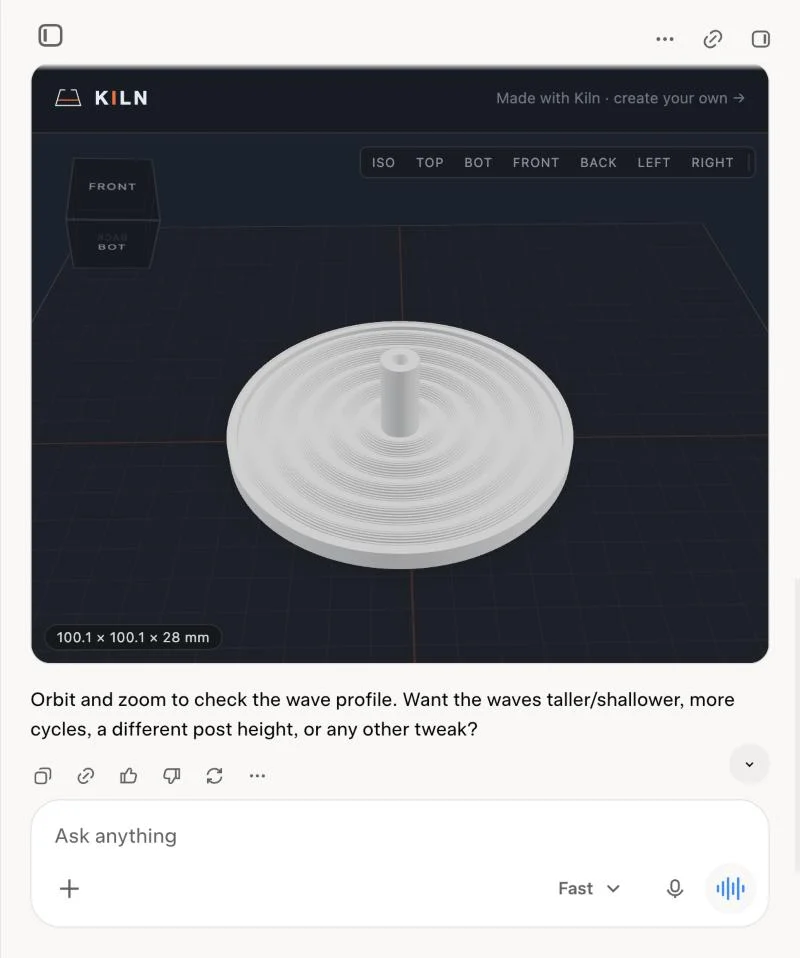
Ask for a part and it opens as a 3D model in the chat. Drag to rotate, switch views, and tip it over to check the bottom before anything prints.
Say what to tweak, in plain words, and the new version opens in 3D in the next reply. The holder above took one round of “make the ripples read as waves”.
Kiln checks the part will print and fits your printer, and flags what is likely to go wrong. With Kiln Pro, it also says exactly what to change.
Where a panel can’t show, Kiln hands back a link that opens the same 3D view in your browser. Starting and watching a print needs Kiln installed on the computer next to your printer.
An example conversation
Design an incense holder: a round dish with water-ripple rings spreading out from a raised centre that holds the stick.
The holder opens in 3D in the chat
Here it is, 100 mm across. Orbit it to check the ripples. Want the waves taller, or a different post height?
It’s perfect. Print it.
It’s waiting for your OK in the approval prompt.
You approve it
Printing. Ask me any time how it’s going.
What Kiln adds
The same job both ways, from a description to a part on your printer.
| Step | Grok on its own | Grok with Kiln |
|---|---|---|
| Make it | Writes CAD code. Seeing the shape takes a CAD program on your computer. | Kiln builds the model and opens it in 3D right in the chat. |
| Check it | A problem shows up in the slicer, or partway through the print. | Kiln checks overhangs, thin walls, warping risk, and whether it fits your printer, before anything prints. |
| Change it | Ask again and get new code. Keeping track of which version was better is on you. | Ask for a change in the same chat, and Kiln keeps every try tied to what you first asked for. Pro makes it Git for 3D: what changed, drawn on the part, and a branch for the risky idea. |
| Slice it | Export the file, open your slicer, and pick the settings. | Kiln slices it in the slicer you already have: PrusaSlicer, OrcaSlicer, or Bambu Studio.Kiln on your computer |
| Print it | Send the file to your printer yourself. | Grok sends it to your printer, and it starts only after you say yes.Kiln on your computer |
| Watch it | Check on it in the printer’s own app. | Kiln watches every print it starts and stops it if a heater fails. A live monitor opens in the chat with the camera, progress, and pause and stop, and Grok checks the camera picture when you ask.Kiln on your computer |
| No printer? | Find a print shop, upload the file, and wait for a quote. | Ask for a price, and Kiln shows what it costs printed and shipped to you. |
| More printers | You run each one yourself. | Business runs several at once and picks the printer for each job. Free and Pro drive one at a time. |
Steps marked “Kiln on your computer” need Kiln installed on the computer next to your printer. The camera shows when your printer has one. A print can still fail, with Kiln or without it; Kiln catches what it can see before the print starts, and asks before it uses your plastic.
Two minutes on grok.com. Nothing to install until you want your own printer in the loop.
On grok.com, open Connectors, choose New Connector, then Custom. Name it Kiln and paste Kiln’s address.
https://api.kiln3d.com/mcpGrok opens Kiln’s sign-in the moment you add it. Sign in or make a free account, and Kiln shows under Connected. How the connector works.
Describe a part in a new chat. Kiln designs it, checks it will print, and opens it in 3D right there.
Install Kiln on the computer next to your printer. Grok can then send a print to it, and you approve every one. Install Kiln. See the printers Kiln works with.
A print uses real plastic on a real machine, so Grok can’t start one alone. Kiln shows you the model, then waits for your yes in an approval prompt. You can say yes to one printer for a while so it stops asking, and end that whenever you like.
Yes, with Kiln. Describe a part in Grok; Kiln designs it, checks it will print, and opens it as a 3D model right in the conversation. To print, install Kiln on the computer next to your printer; Grok then sends the print there and you approve it. Tested in Grok on the web.
Yes. With Kiln connected, Grok turns a plain description into a real 3D model you can turn over, measure and change in the same chat, then print or download. No CAD skills needed.
Grok can write the code for a 3D model. Kiln builds it, opens it in 3D right in the chat, checks it will print (overhangs, thin walls, warping, and whether it fits your printer), slices it in your own slicer, and sends it to your printer after you say yes.
The most capable one your plan offers. xAI’s newest model is Grok 4.7; in Grok’s model menu, pick Expert or Heavy rather than Fast for design work. Kiln does the checking and the printing; the model does the thinking, so a stronger model means better designs and fewer retries.
Add Kiln inside Grok by its address, https://api.kiln3d.com/mcp, and sign in. Nothing to install. The setup steps on this page take a few minutes.
No. With the connector, Grok can design a part and check it will print without one. You need a printer, or someone else’s, to make it.
We tested it on grok.com. xAI says connectors work in the Grok phone apps too, so a connector you add on the web should follow you there.
No. Kiln shows you the model, then waits for your yes before every print. You can say yes for a while so it stops asking on that printer, and end that whenever you like. Auto-print is off unless you turn it on.
Bambu Lab, Creality, Prusa, Elegoo, and most Klipper and OctoPrint machines. The full list is on the supported printers page.
No. Kiln is independent, open-source software you can use from Grok. It is not affiliated with or endorsed by xAI.
Kiln is independent, open-source software. It is not affiliated with or endorsed by xAI.